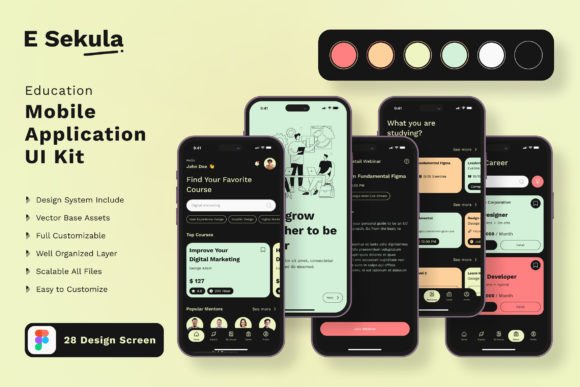
Effortless Education App Design with a Versatile UI KIT
Imagine launching a sleek, professional education app without starting from scratch. The Education App Mobile UI KIT offers exactly that—a comprehensive collection of 20 pixel-perfect screen designs and over 80 UI elements designed to streamline your workflow. Whether you're a designer, developer, or entrepreneur, this resource provides a solid foundation for creating polished mobile applications quickly and efficiently.
This template is built for flexibility. Each screen is fully editable, allowing you to add, remove, or modify components to match your specific vision. The design files are compatible with Adobe Photoshop, Adobe XD, and Sketch, ensuring you can work in the environment you're most comfortable with. With 100% vector layers and scalable elements, your designs will maintain crisp quality across all device sizes.
Practical Uses for Modern Learning Platforms
Creating a consistent and engaging user experience is crucial for any educational application. This UI KIT supports a wide range of project types, from language learning apps and course platforms to student management tools and interactive textbooks. The clean, modern typography and intuitive layouts help guide users through content smoothly, enhancing both usability and visual appeal.
Consider these common applications:
- Course Marketplaces: Design seamless browsing and enrollment flows.
- Student Dashboards: Organize progress tracking, schedules, and resources clearly.
- Interactive Quizzes & Lessons: Build engaging assessment screens with ease.
- Community & Discussion Features: Create interfaces for collaboration and communication.
The included free fonts and icon vectors help maintain a cohesive brand identity across your entire application. By using consistent design assets, you strengthen brand recognition and present a more professional image to your users.
Tips for Customizing Your Application Design
To get the most out of this design asset, start by defining your app’s core color palette and mood. The KIT makes it easy to change color styles globally, ensuring visual harmony throughout. Test different font pairings from the provided options to find combinations that balance readability with personality—perhaps a clean sans-serif for body text paired with a distinctive display font for headings.
Always consider your end user’s experience. Prioritize clarity in navigation and content hierarchy. The symbol objects and layered structure allow for quick adjustments, so you can prototype different layouts and gather feedback efficiently. Remember, the goal is to create an interface that feels both inviting and functional.
Choosing a well-designed template like this not only accelerates your development process but also elevates the final product. It provides a professional starting point that can adapt to various educational contexts, helping you focus more on content and less on foundational design work. With the right tools, building an intuitive and visually appealing education app becomes a much more achievable goal.